If every company practised secure software deployment, a lot of common cybersecurity vulnerabilities wouldn’t be so easy to exploit.
Some of the most common security weaknesses we’ve seen over the past decade can be prevented during the software deployment phase.
Risks like insecure default passwords, unencrypted data, and unsupported and out-of-patch applications can be mitigated using a set of processes and rules to select vendors, deploy applications, and manage their lifecycles.
This blog post explains why and, most importantly, how to securely deploy software of all kinds. We give you a high-level ruleset that can be applied to everything from SaaS applications to ERP modules.
How to Secure Software Deployments During the Pre-Acquisition + Evaluation Stage
Deploying secure software starts with buying secure software.
To be secure on go-live, software should ideally be built securely to begin with. Unfortunately, software vendors will never tell you directly that their application is unsafe.
Most software, no matter who makes it, will have exploitable vulnerabilities. According to one report, the total number of software vulnerabilities grew by 61% year-over-year (YoY) in 2024.
“Procure” rhymes with secure and should feel that way, too
Software risk assessment is complex but very important for secure software deployment.
That’s why we advise companies that want to ensure secure software deployment to take simple steps first. Rule out the most obvious risks from any given application, and you can make a dramatic difference to your third-party software risk profile.
Specifically for secure software deployment, we recommend that every company cross-check their internal processes and the specifications of any software they are considering deploying based on the six rules we explain below.
1. Establish a secure acquisition policy
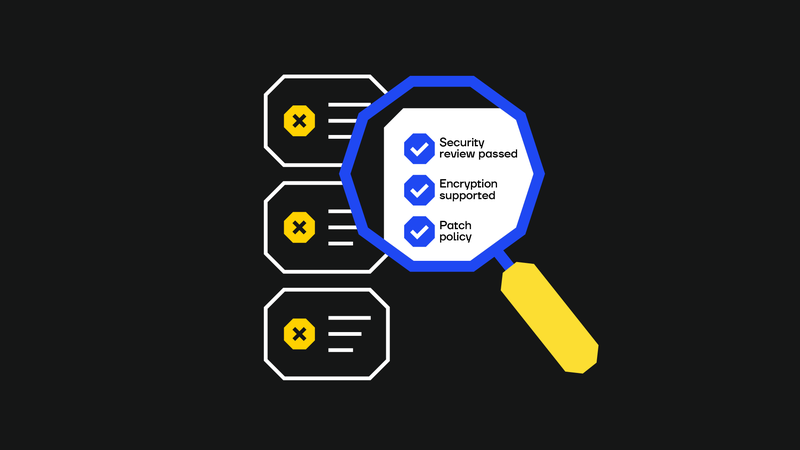
A secure acquisition policy is a checklist of the controls and requirements that show whether or not software has the same basic security standards as the organisation.
For instance, if an organisation has security controls like properly defined access controls, passwords of a minimum length, and certain periods of data retention, then any piece of software they buy needs to support these controls, too.
A document that translates these security control “non-negotiables” into procurement guidelines can help avoid expensive and risky mismatches before software deployment.
We’ve seen businesses buy expensive software licences only to realise that something relatively basic like MFA compatibility was missing, forcing them to do a very costly procurement U-turn.
2. Assess the software’s fundamental security features
The acquisition policy (see previous point) will set certain minimum requirements for software security controls.
Beyond these, we also advise companies to ensure any software they buy can at least do the following after deployment:
- Encrypt data at rest and in transit.
- Support various authentication mechanisms, including MFA.
- Allow granular access control if the application is going to be used by multiple job roles. We especially recommend assessing multi-menu interfaces for access control difficulties.
3. Determine whether the vendor is secure
It pays to be paranoid when it comes to secure software deployment.
In most software deployment situations (especially when a vendor is smaller or newer on the market), we recommend against automatically trusting vendor claims about their cybersecurity practices.
Take the same approach to assessing vendor security claims that former US president Ronald Reagan took when talking about the Soviet Union: “Trust but verify.”
The simplest way to verify is to ask the vendor slightly more specific questions, such as, “Have you done penetration testing, and if so, how often?” Then, if the answer is yes, “Can we see the latest pen test report?”
It is easy for vendors to share redacted pen test reports. If those pen tests highlight security issues, you can also ask the vendor what's being done to remediate them.
If you know that a vendor has done a pen test, you can go further and check who (i.e., what company) did that pen test. As a rule, a gigantic app with diverse functionalities cannot be tested in a couple of days by an inexperienced freelance pen tester.
Deploying critical applications from a lesser-known vendor? Consider conducting a penetration test. You can partner with a penetration testing partner, such as SECFORCE, to perform an assessment in whatever environment the software lives.
Of course, it's also important to check a vendor’s certifications. ISO 27001 certification is generally a good sign. Beyond ISO, your organisation might also need proof of GDPR compliance, PCI DSS, etc.
4. Look for regulatory alignment (especially for third-party hosted applications)
When your organisation can’t control the data storage or retention features of an application, you need to make sure that the vendor is taking good care of the data you entrust them with.
Is data being stored in a way that complies with the GDPR/CCPA or other legislation you are covered by? Could you stand over their data security practices if the vendor was breached?
As one SECFORCE hacker who contributed to this article said, “You can transfer risk, but you cannot transfer accountability.” If the vendor’s systems fail and expose your customers’ data to risks that were not supposed to be there, you (not the vendor) may be held responsible.
5. Check for IT security control compatibility before software deployment
It is always easier to securely deploy software when it easily integrates with your existing security controls or requires minor changes than to heavily modify your controls to fit new software.
This is true even if modifying existing controls (e.g., adding a firewall rule) is sometimes unavoidable (as is the case with the Microsoft example below).
Typically, vendors will be able to provide very specific integration requirements to help you assess this pre-acquisition. For example, if you use Microsoft products, they give an allow-list of endpoints you need in your organisation to make those products work.
Compatibility requirements are organisation-specific, but generally, we recommend checking:
- That software logs will be collectable by monitoring tools.
- Firewall and VPN compatibility, if necessary.
- If there is support for centralised authentication methods, such as Single Sign-On (SSO) and identity federation protocols like OAuth 2.0 or SAML.
- Whether the software requires to run high-privileges on every machine (ideally, it won’t).
- Whether the software deployment supports integration with the organisation’s existing security software, such as AV/EDR.
6. See how the software is supported by its vendor after deployment
If the application is going to be hosted by a third party, what does their support process look like? See if you can find out when the last patch update took place. If the software has not been patched for a long time (e.g., several years), why not?
Some advice we’d give here is to ask a vendor the following cybersecurity questions:
- Check if the vendor manages patch updates.
- Determine how frequently patches are released.
- Identify the date of the last patch update.
- If the software has not been patched in years, ask why.
- Does the vendor back up data, and at what frequency?
- Are business continuity/disaster recovery plans in place?
Other cybersecurity questions to ask a vendor include the following:
- How do they manage vulnerability reports?
- Does the vendor allow users/clients to report vulnerabilities? And if so, how are those reports handled/managed?
How to Secure Software Deployments After They Have Been Deployed
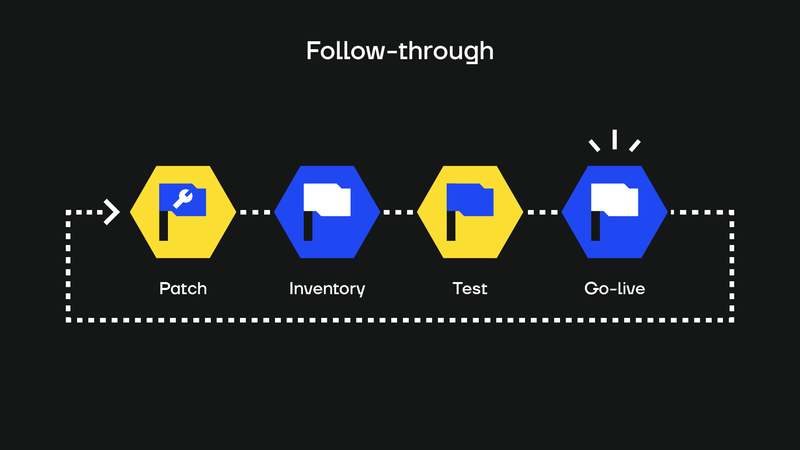
Just like a good golf or tennis swing, secure software deployment needs a follow-through. We recommend that companies continue to think about application deployment after it goes live.
Specifically, we advise IT teams to plan and monitor the post-software deployment measures, which we explain below.
Patch management
Patch management is not just meeting your responsibility to deploy patches to locally hosted applications; it’s also monitoring the vendor’s approach to patch releases to make sure they are consistent, too.
Proactive vendors will be quick to respond to new CVEs like Log4j and will help you stay safe in the long run.
Asset inventory
One survey from 2021 showed that over 69% of companies had experienced a breach due to a forgotten or unmanaged asset.
The best way to prevent assets from being forgotten is to keep track of them to begin with.
Your asset inventory is a cybersecurity tool - keep it up to date, and you won’t need to worry about long-abandoned SaaS apps allowing a third party to hijack an API with access to customer data.
Regular pen testing after software deployment
Regular penetration testing after software deployment is important, though the ideal frequency will depend on the type of software deployed.
For on-premises deployments, conduct regular vulnerability scans and include the host in periodic penetration tests. For third-party-hosted solutions, look for evidence that the provider performs ongoing testing. You can't (or at least shouldn’t!) just ask for a pen test report pre-acquisition and then forget about it.
Removal at end-of-life
Plan for the inevitable. At the time of writing this blog post, Windows 10 is nearing the end of its support lifecycle, but we are confident that if someone reads this article in ten years, many thousands of business machines will still be running Windows 10 OSs.
Prevent dangerous legacy issues from emerging in your environment by planning for assessment and removal when you deploy software.
Secure Your Software Deployments with SECFORCE
A company that safely deploys software can build trust within its market and avoid being a source of third-party risk for someone else.
SECFORCE are experts in helping companies securely deploy software and test their existing deployment configurations.
Contact us to learn more.